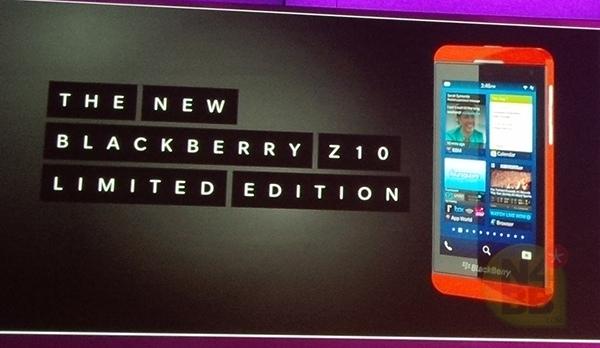
Reluctantly I had to return my Dev Alpha A in January for the trade-up program, but I knew as I awaited eagerly that I would eventually receive this beautiful shiny new red Z10 phone! Well it has finally arrived and I must tell you, it is an amazing piece of technology. The Blackberry 10 OS just flies and there are so many features, so many functions, it is a production and entertainment power-house that fits in your pocket!
I was able to successfully transfer over the entire contents of my old Torch to the Z10 after using the latest Blackberry Desktop Manager and Blackberry Link. The experience was relatively smooth and I am amazed how the Blackberry Hub just magically seems to collect information from multiple sources and make it easy to organize and follow. Anyone familiar with the Playbook knows how simple it is to drag content over to the device to play videos and music, but if you want to Sync everything to match up with the content on your hard drive you can use Blackberry Link. Speaking of "link", you can also link related or duplicate contact entries in the Hub to quickly combine them! Awesome!
Here is an unboxing video of this amazing new phone!
Unboxing Red Developer Edition Blackberry Z10
Monday, 18 March 2013
Crystal Blackberry
I received a nice surprise from Blackberry recently. As a thank you to developers who made specific deadlines in the fall to submit applications for the upcoming Z10 Blackberry 10 platform, Blackberry has shipped us the "Crystal Blackberry Award".
This beautiful life-sized crystal version of a Z10 sits in a heavy marble base and is inscribed with the words "Thank you for your Blackberry 10 App. We look forward to a shared success!" - The Blackberry Developer Team.
See the unboxing video linked here for more on this heart-warming gift from Blackberry.
Rare Crystal Blackberry Unboxing
Saturday, 12 January 2013
Blackberry 10 Is Almost Here
It has been a busy past few months with Blackberry 10! I have had a lot of fun hacking away on my Dev Alpha A device and have recently sent it back to RIM for the Blackberry 10 LE phone Trade-Up promo. I hope to be able to do an unboxing and report here next month on my new BB10 LE phone!
Meanwhile, I have released 4 apps for the BB10 platform and managed to score some Blackberry Port-a-Thon cash for my Marmalade app. My "Marmalade" app (Quantum Colliders) is available on both BB10 and Playbook and I am planning to improve it with time... add more levels, sound, save features and more. I have also 3 other apps on the BB10 platform, including my Text Clock app (also available on Playbook), Vibrating Massager, and Project Gutenberg Aesop's Fables.
Here are some of my other apps for Blackberry on the Playbook only and pre-BB10 phones:
Smoking Calculator (Playbook)
Talking Alarm Text Clock Pro (Playbook)
Talking Alarm Text Clock Demo (Playbook)
Doctor Braun App (Playbook and pre-BB10 phones)
Raspberry Pi App (Playbook and pre-BB10 phones)
Wednesday, 19 December 2012
My New Game Released!
Although the game is available for download in the app store, I have more features to add in the upcoming weeks and months. One of the first features I wish to add is the ability to have the levels locked at the beginning and unlock as you progress through the levels. The game will save your score for each level, so that when you load up the app to play each time it remembers your progress and allows you to improve your scores. That will involve learning to do some basic file read/writes. All that has to be done is to write and load an array that keeps track of the scores on each level.
For example, the array could be score[gamelevel] which is originally set to 0's indicating the level is locked. As you complete levels, you save the score as either 1, 2 or 3 indicating the score achieved. If you do not finish the level at all, it will remain 0. Therefore, it is easy to see the last level achieved just by scanning through the array increasing in gamelevel until you reach the first "0" level. The array will write and load at each level achievement, and at the beginning of the game when it loads. Also, the icons on the game level selection screen will have to display either a lock, 1, 2 or 3 stars on each level depending on the score. This will basically read through the array and show a lock for all uncompleted levels and scores on levels that have been done.
The next major feature that needs to be added is sound. There will need to be sound effects which indicate whenever balls get launched or hit obstacles and the particle, as well as some background music which will run in a continuous loop. There can be several different background music tracks depending on the level. A button will have to be added on the main screen to allow music and sound-effects to be toggled on and off.
Finally, once those basic features are added, new levels and also new types of balls and obstacles will be created. Ideas include worm-hole like regions which allow balls to teleport, special types of balls that split or do other actions when the screen is tapped, regions that accelerate or decelerate balls, different kinds of walls and objects (for example circular walls instead of just rectangles) and so on. There are so many possible permutations, the combinations are staggering and many levels are possible.
So there you have it, my first Blackberry game ever, made with Marmalade SDK and so now I have my project planned out for the next year, to slowly and steadily improve Quantum Colliders and make it a cool new physics game for the Playbook and Blackberry 10 phone!
Friday, 23 November 2012
Blackberry Playbook Mini Keyboard
Black Friday is upon us and there are some amazing deals to be had! Unfortunately, most items are in limited stock and only a few early birds enjoy the benefits. One such item is the Blackberry Playbook Mini Keyboard which I am using right now to write this blog. I wanted to share a quick review in case you are contemplating a purchase this holiday season.
The keyboard is priced at $69 at some retailers right now, and while not available online they may have a few sitting in stores. It is well built and boasts a 30 day battery life after full charge. The keyboard comes with a rugged leather case which is normally sold separately for about $40-50 alone, so having it available with a keyboard now is a good deal. There are sales at the moment for the rugged rubber/leather case for about $15 so if you are only looking for that, it is well worth it. Not to mention the rapid charging stand can also be had for $15 if you can find it.
Back to the mini keyboard. It is easy to set up and will link not only to a Playbook but your phone, computer, set-top box, game console or any Bluetooth HID enabled device. The keyboard comes with a touchpad which lets you right-click with two-finger tapping and also has scroll features. In this respect, it becomes quite versatile.
I found a few disadvantages however, although easy to overlook once you get the hang of using it. First, the keys on the rows are arranged in a straight grid, unlike a traditional keyboard where alternating rows of keys are slightly offset. This makes it a bit awkward to type on at first, but after a few minutes your fingers learn where the keys are and it gets a bit easier. The keys are truly small so it can be a bit of a task for thick-fingered people, but certainly lets you type much faster than using the on-screen keyboard. It is also easier on the fingers than using the keyboard on your phone if you are familiar with Blackberry Bridge.
The keyboard does not come with a charger, but relies on you to use your Playbook charger or any other USB 5V accessory plug. I am not sure if it needs 1 amp rated charger or if your older phone chargers will work to charge it (although perhaps slower) but it took me about 2 hours to get it completely charged from out of the box.
Finally, the case itself lets you strap in the keyboard with elastic holders at the corners. The problem is that the lower left corner elastic covers the on/off switch for the keyboard, so if you are planning to turn it on and off each time, it can be a pain. I usually just leave it on and it goes into power save mode after a few minutes of inactivity. As well, if you want to activate things again once your Playbook has fallen asleep, simply hit RETURN on your keyboard a few times and it will wake up the keyboard and your Playbook at the same time.
You can select text by double-finger tapping a word, but then to expand your selection you either have to use fingers on the screen to pull the tags at the end of your selected text, or if you prefer using the keyboard you can hold down SHIFT and use the left/right arrow to move your cursor.
The one other drawback is the small stand on the back of the case that you pull out to stand your Playbook vertically. It can sometimes be hard to grab it and pull it out, and it is short and so your Playbook reclines at almost a 30-40 degree angle to the table. I prefer it to be higher, perhaps 70-80 range, so I have to proper the stand leg up on something. It would have been nice to allow several options for angle, but this is a minor issue. A small piece of cardboard can be tucked under the leg to achieve the same thing, so you may have to just carry that along with you if needed.
Overall the keyboard is a nice addition to the Playbook power user. At $69 it becomes a reasonable purchase when you compare to a Playbook that costs about $120 on sale these days, and that many other similar keyboard/trackpad combinations are in the $40-60 range. However, any more than that price and it really has to be a killer product for me. As you can see by the length of my blog entry, the keyboard certainly speeds up the ability to type on the go and makes your Playbook look like a little mini laptop. It is nice and functional and looks good, can be used with other devices. I would pick up another one if they were available, but unfortunately they are out of stock. Let us hope for some more deals coming up in the next few months, because the regular price for the keyboard at $119 just doesn't justify the purchase, in my opinion, unless you are a hardcore Playbook user who must have a keyboard.
A few more things I forgot to mention. Using the keyboard clears up a lot of room on your screen which gives you much improved web functionality, especially if you are typing into web-based applications, forums or emailing/blogging online. Often when the Playbook on-screen keyboard pops up it will take up a good 30-40% of your screen space and you can barely see the website. The fact that a little mouse cursor also pops up gives you much better control over on-screen elements as well, in case you have trouble using your fat fingers normally on the screen. These features also add to improving the experience of using the Playbook and therefore the mini keyboard is a fun accessory to have! By the way, my typing has improved even further in the past few minutes and the fact that the keys are not offset on alternating rows no longer bothers me. You easily can learn to use it and be typing extremely quickly and without any finger fatigue!
The keyboard is priced at $69 at some retailers right now, and while not available online they may have a few sitting in stores. It is well built and boasts a 30 day battery life after full charge. The keyboard comes with a rugged leather case which is normally sold separately for about $40-50 alone, so having it available with a keyboard now is a good deal. There are sales at the moment for the rugged rubber/leather case for about $15 so if you are only looking for that, it is well worth it. Not to mention the rapid charging stand can also be had for $15 if you can find it.
Back to the mini keyboard. It is easy to set up and will link not only to a Playbook but your phone, computer, set-top box, game console or any Bluetooth HID enabled device. The keyboard comes with a touchpad which lets you right-click with two-finger tapping and also has scroll features. In this respect, it becomes quite versatile.
I found a few disadvantages however, although easy to overlook once you get the hang of using it. First, the keys on the rows are arranged in a straight grid, unlike a traditional keyboard where alternating rows of keys are slightly offset. This makes it a bit awkward to type on at first, but after a few minutes your fingers learn where the keys are and it gets a bit easier. The keys are truly small so it can be a bit of a task for thick-fingered people, but certainly lets you type much faster than using the on-screen keyboard. It is also easier on the fingers than using the keyboard on your phone if you are familiar with Blackberry Bridge.
The keyboard does not come with a charger, but relies on you to use your Playbook charger or any other USB 5V accessory plug. I am not sure if it needs 1 amp rated charger or if your older phone chargers will work to charge it (although perhaps slower) but it took me about 2 hours to get it completely charged from out of the box.
Finally, the case itself lets you strap in the keyboard with elastic holders at the corners. The problem is that the lower left corner elastic covers the on/off switch for the keyboard, so if you are planning to turn it on and off each time, it can be a pain. I usually just leave it on and it goes into power save mode after a few minutes of inactivity. As well, if you want to activate things again once your Playbook has fallen asleep, simply hit RETURN on your keyboard a few times and it will wake up the keyboard and your Playbook at the same time.
You can select text by double-finger tapping a word, but then to expand your selection you either have to use fingers on the screen to pull the tags at the end of your selected text, or if you prefer using the keyboard you can hold down SHIFT and use the left/right arrow to move your cursor.
The one other drawback is the small stand on the back of the case that you pull out to stand your Playbook vertically. It can sometimes be hard to grab it and pull it out, and it is short and so your Playbook reclines at almost a 30-40 degree angle to the table. I prefer it to be higher, perhaps 70-80 range, so I have to proper the stand leg up on something. It would have been nice to allow several options for angle, but this is a minor issue. A small piece of cardboard can be tucked under the leg to achieve the same thing, so you may have to just carry that along with you if needed.
Overall the keyboard is a nice addition to the Playbook power user. At $69 it becomes a reasonable purchase when you compare to a Playbook that costs about $120 on sale these days, and that many other similar keyboard/trackpad combinations are in the $40-60 range. However, any more than that price and it really has to be a killer product for me. As you can see by the length of my blog entry, the keyboard certainly speeds up the ability to type on the go and makes your Playbook look like a little mini laptop. It is nice and functional and looks good, can be used with other devices. I would pick up another one if they were available, but unfortunately they are out of stock. Let us hope for some more deals coming up in the next few months, because the regular price for the keyboard at $119 just doesn't justify the purchase, in my opinion, unless you are a hardcore Playbook user who must have a keyboard.
A few more things I forgot to mention. Using the keyboard clears up a lot of room on your screen which gives you much improved web functionality, especially if you are typing into web-based applications, forums or emailing/blogging online. Often when the Playbook on-screen keyboard pops up it will take up a good 30-40% of your screen space and you can barely see the website. The fact that a little mouse cursor also pops up gives you much better control over on-screen elements as well, in case you have trouble using your fat fingers normally on the screen. These features also add to improving the experience of using the Playbook and therefore the mini keyboard is a fun accessory to have! By the way, my typing has improved even further in the past few minutes and the fact that the keys are not offset on alternating rows no longer bothers me. You easily can learn to use it and be typing extremely quickly and without any finger fatigue!
Friday, 16 November 2012
Marmalade SDK for Blackberry
It has been a couple months since I received my free Blackberry Playbook and Marmalade SDK license. While the learning curve has sometimes been slow, it really is fun and relatively easy to put together "native" apps using Marmalade! Fortunately, the SDK allows porting using the same code to many other platforms, meaning that the app I develop for Blackberry will potentially also find some life on other platforms!
One of the sites that has been instrumental in providing some basics is drmop.com which has a number of good startup samples. As well, Marmalade itself comes with a huge library of examples showing the different features available to use in both 2D, 3D and user-interface demos widget demos. I am happy to say that after looking at a few basic demos, and playing around with Marmalade on Microsoft Visual C++ 2010 Express (also free), my physics-based game is nearing completion!
The game is similar to "Angry Birds Space" in that it involves shooting particles instead of birds (from a launch area) towards a target (a puck instead of pigs inside structures). In my case, the objective is to hit a puck with the particles, which pushes the puck towards a target zone. You have an infinite number of particles available to use, but your points go down the more particles you need to push your puck to the target. To make matters more difficult, some of the particles are charged "negative" or "positive" (some are "neutral") and there are various negative and positive-charged spots on the game field (which appear as the levels increase) which cause deflection/attraction of your shooting particle, making it more difficult to hit your target puck. There are also rectangular obstacles which reflect your particles/puck and of course the walls of the screen which are also reflecting.
While not as cute as "Angry Birds Space", the game has potential and while it may be a bit dry and purely physics-based and geometrical at the moment, I plan on improving the game in the future by applying a "theme" while keeping the same game objectives. For example, the particles could be changed into little animals or eggs, and the puck could be made into a large round fruit. The rectangular objects could be boxes and the negative/positive charge deflections/attractions could be made to be changes in the terrain height indicating mountains or valleys.
I look forward to announcing the game on this blog when it is ready, hopefully in the next 2-3 weeks!
Meanwhile, check out the Blackberry 10 Dev Alpha Blog which I found, which features some links to pre-release apps to try out.
Sunday, 4 November 2012
iPad Mini vs. Playbook Pricing Fun
Now that Apple has unveiled it's latest tablet offering, the iPad mini, we are rushing into the holiday season with Apple having played it's hand and revealing it's cards. This is bad news for Apple, unless they plan on reducing prices over the next two months. We are likely to see a few more surprises with new product announcements from their competitors (Amazon, Google and Microsoft) who are going to aggressively price their product to compete and do their best to take a bite out of Apple's sales.
There has already been much negative buzz about the pricing scheme Apple has set for the iPad mini. At least in my area, their basic cheapest 16GB model comes in at a whopping $329, followed by 32GB model at $429 and 64GB model at $529. Apple needed to follow this pricing because they are offering their iPod Touch (4" screen) at $299 and iPad 2 (10" screen) for $399. They had no choice but to price it somewhere in-between.
Some recent news has determined that Apple's bill-of-materials or "BOM" on the iPad mini comes in around $188. That means they are making $141 in profit on top (75% markup). Apple could easily reduce the price if it wanted to and still earn a profit, but that could also mean they would have to drop the price of their iPod Touch since people may prefer buying the larger screen iPad mini (if it has essentially the same functions as the iPod Touch). The fact is, competing tablets from Google, Amazon, Blackberry and many others in the 7" screen space have already set a a price level which is much lower and is now in consumer minds.
Apple is relying on brand loyalty and has positioned itself in the "luxury" tier. Sure it has a strong content ecosystem and thousands of apps, but I also sense some complacency. Apple has rode the success of the iPhone and iPad for the past few years, and they think they can continue to push out over-priced products and have droves of consumers lining outside their stores waving their credit cards. But there will be a point of saturation.
Consumers loyal to Apple would have likely already bought an iPad over the past few years. Anyone who didn't already buy an iPad is not just waiting for a cheaper and smaller iPad, but is a more discretionary buyer with no particular loyalty, looking at the entire tablet space for value. These are the buyers who likely fueled the increased sales of competing tablets immediately following the iPad mini event. Amazon reported one of it's best day of sales ever on the Kindle Fire, right after the iPad mini pricing was announced. It seems many consumers decided it was over-priced as well.
A recent article from The Gadget Masters titled "3 Reasons Why You Would Be Stupid To Buy The iPad Mini" makes the following statement (and I quote):
You can purchase 2 Playbooks with double the memory of the iPad (32GB versions) at $149 x 2 = $298 and still be $31 less than 1 iPad mini with basic 16GB size. In fact, if you want to compare the same memory size devices, you could purchase 3 Playbooks (all 32GB) at $149 x 3 = $447 and only pay $18 more than the 1 iPad mini 32GB. If you had to buy a lightning dock adapter for your iPad mini, cancel out that $18 and basically 3 Playbooks (32GB) = 1 iPad mini (32GB).
Looking at the 64GB versions, you can purchase 2 Playbooks (with 64GB) $219 x 2 = $438 and pay only $9 more than 1 iPad 32GB at $429. Your 2 Playbooks would have a combined total of 128GB, or four-times that of your iPad mini memory (32GB) at almost the same cost. You could buy 4 Playbooks (with 32GB) $149 x 4 = $596, and be only $67 more than 1 iPad mini 64 GB model.
Finally, if you bought 2 Playbooks with 64GB ($219 x 2 = $438) and 1 Playbook with 32 GB ($149) that would bring the total to $587 for all 3 Playbooks, which is only $58 more than the 1 iPad mini 64GB version. Your 3 Playbooks would have a combined memory of 160GB, compared to the 64GB of your single iPad mini, and your whole family could have fun using them.
Now the market will decide. This holiday season, we will see how many people are looking to buy tablets in general, and out of those, how many people shopping for 7" screen sizes will walk out of the store with an iPad mini. Will we get a phenomenon where people buy this device for gifts because of the associated "prestige", or to meet a certain value requirement for their gift? If you receive a Playbook as a gift, will you think the gift-giver cheapened out on you? Would you be more impressed knowing they over-paid? After all, isn't someone's love supposed to be about the amount of money they spent?
There has already been much negative buzz about the pricing scheme Apple has set for the iPad mini. At least in my area, their basic cheapest 16GB model comes in at a whopping $329, followed by 32GB model at $429 and 64GB model at $529. Apple needed to follow this pricing because they are offering their iPod Touch (4" screen) at $299 and iPad 2 (10" screen) for $399. They had no choice but to price it somewhere in-between.
Some recent news has determined that Apple's bill-of-materials or "BOM" on the iPad mini comes in around $188. That means they are making $141 in profit on top (75% markup). Apple could easily reduce the price if it wanted to and still earn a profit, but that could also mean they would have to drop the price of their iPod Touch since people may prefer buying the larger screen iPad mini (if it has essentially the same functions as the iPod Touch). The fact is, competing tablets from Google, Amazon, Blackberry and many others in the 7" screen space have already set a a price level which is much lower and is now in consumer minds.
Apple is relying on brand loyalty and has positioned itself in the "luxury" tier. Sure it has a strong content ecosystem and thousands of apps, but I also sense some complacency. Apple has rode the success of the iPhone and iPad for the past few years, and they think they can continue to push out over-priced products and have droves of consumers lining outside their stores waving their credit cards. But there will be a point of saturation.
Consumers loyal to Apple would have likely already bought an iPad over the past few years. Anyone who didn't already buy an iPad is not just waiting for a cheaper and smaller iPad, but is a more discretionary buyer with no particular loyalty, looking at the entire tablet space for value. These are the buyers who likely fueled the increased sales of competing tablets immediately following the iPad mini event. Amazon reported one of it's best day of sales ever on the Kindle Fire, right after the iPad mini pricing was announced. It seems many consumers decided it was over-priced as well.
A recent article from The Gadget Masters titled "3 Reasons Why You Would Be Stupid To Buy The iPad Mini" makes the following statement (and I quote):
"The iPad Mini’s specs are comparable to the BlackBerry PlayBook in most areas. In the areas that the two differ, the PlayBook actually has better specs (1GB RAM versus 512MB RAM for example). At only $149, the PlayBook is a far more attractive option than the iPad Mini, since buyers can save $180 (and get a free upgrade to BB 10)."For fun I decided to do some pricing comparisons to see how the Blackberry Playbook stacks up with respect to the iPad mini. At my local retailer I can get a Playbook 32GB for $149 and a Playbook 64GB for $219. Note that there is no more 16GB version available. In fact, a recent sale made the Playbook 32GB available at $129 for a short period of time before it was completely sold out. Compare this with the iPad mini at $329 (16GB), $429 (32GB) and $529 (64GB).
You can purchase 2 Playbooks with double the memory of the iPad (32GB versions) at $149 x 2 = $298 and still be $31 less than 1 iPad mini with basic 16GB size. In fact, if you want to compare the same memory size devices, you could purchase 3 Playbooks (all 32GB) at $149 x 3 = $447 and only pay $18 more than the 1 iPad mini 32GB. If you had to buy a lightning dock adapter for your iPad mini, cancel out that $18 and basically 3 Playbooks (32GB) = 1 iPad mini (32GB).
Looking at the 64GB versions, you can purchase 2 Playbooks (with 64GB) $219 x 2 = $438 and pay only $9 more than 1 iPad 32GB at $429. Your 2 Playbooks would have a combined total of 128GB, or four-times that of your iPad mini memory (32GB) at almost the same cost. You could buy 4 Playbooks (with 32GB) $149 x 4 = $596, and be only $67 more than 1 iPad mini 64 GB model.
Finally, if you bought 2 Playbooks with 64GB ($219 x 2 = $438) and 1 Playbook with 32 GB ($149) that would bring the total to $587 for all 3 Playbooks, which is only $58 more than the 1 iPad mini 64GB version. Your 3 Playbooks would have a combined memory of 160GB, compared to the 64GB of your single iPad mini, and your whole family could have fun using them.
Now the market will decide. This holiday season, we will see how many people are looking to buy tablets in general, and out of those, how many people shopping for 7" screen sizes will walk out of the store with an iPad mini. Will we get a phenomenon where people buy this device for gifts because of the associated "prestige", or to meet a certain value requirement for their gift? If you receive a Playbook as a gift, will you think the gift-giver cheapened out on you? Would you be more impressed knowing they over-paid? After all, isn't someone's love supposed to be about the amount of money they spent?
Subscribe to:
Posts (Atom)

